
If you run a blog, a small business website, or a content platform, you may be wondering how to monetize your website with AdSense without making your pages look cluttered or distracting. Getting started involves two separate tasks: connecting your website to Google AdSense and improving ad performance after your site is approved.
These tasks require different approaches. Connecting your site allows Google to review it and, if approved, serve ads. Improving click-through rate (CTR), however, requires you to understand your audience, analyze performance data, and provide a positive user experience.
This guide explains how to add website to Google AdSense, resolve common connection and approval issues, understand low CTR, and make responsible improvements without violating Google’s publisher policies.
What Is Google AdSense and How Does It Work?
Google AdSense is a monetization program that allows eligible website owners to display ads on their content. Google uses advertising systems to match ads with available inventory and relevant audiences. Depending on the advertising arrangement and format, publishers may earn revenue from clicks, impressions, or other eligible interactions.
For anyone exploring Google AdSense for beginners, the basic concept is straightforward: you publish useful content, attract visitors, and potentially earn revenue from ads displayed on your pages.
Your earnings are not guaranteed. They can vary according to traffic volume, audience location, content niche, advertiser demand, ad formats, and other factors.
Before getting started, understand these three stages:
- Account setup: Create or access your Google AdSense account.
- Website connection and review: Add your domain, complete the required verification steps, and submit your site for Google’s review.
- Ad placement and optimization: Once eligible and approved, configure ads and monitor their performance.

How to Connect Your Website to Google AdSense
This Google AdSense setup guide covers the general process for connecting a website. Google’s interface and eligibility requirements can change, so always follow the instructions currently displayed in your account and the official AdSense Help Center.
Step 1: Check Your Website’s Eligibility
Before submitting your website, review the Google AdSense site requirements and make sure your site is ready for evaluation.
The AdSense website eligibility requirements can change, but important considerations include:
- Publishing original, useful content that provides value to readers.
- Making your website easy to navigate on desktop and mobile devices.
- Ensuring important pages work correctly and are publicly accessible.
- Providing accurate site information and any applicable privacy disclosures.
- Following Google’s publisher policies and restrictions.
- Having the necessary access to manage your website and complete verification.
If you are wondering how to get AdSense approval, there is no guaranteed formula. Focus on content quality, accessibility, a clear website structure, and compliance with Google’s requirements. Google does not specify one universal number of blog posts that guarantees approval.
Step 2: Add Your Website to Your AdSense Account
Sign in to your Google AdSense account and locate the website management section. Follow the current instructions to add a new site to AdSense.
Enter the domain you intend to monetize and check that it is correct. For example, confirm that you have entered your own domain rather than an unrelated address or an incorrect subdomain.
If you manage multiple websites, check the requirements for each one. Adding a website to your account does not automatically mean it has been approved to display ads.
The precise menu names and available options may vary as Google’s interface changes. Follow the instructions in your current account rather than relying exclusively on older screenshots.
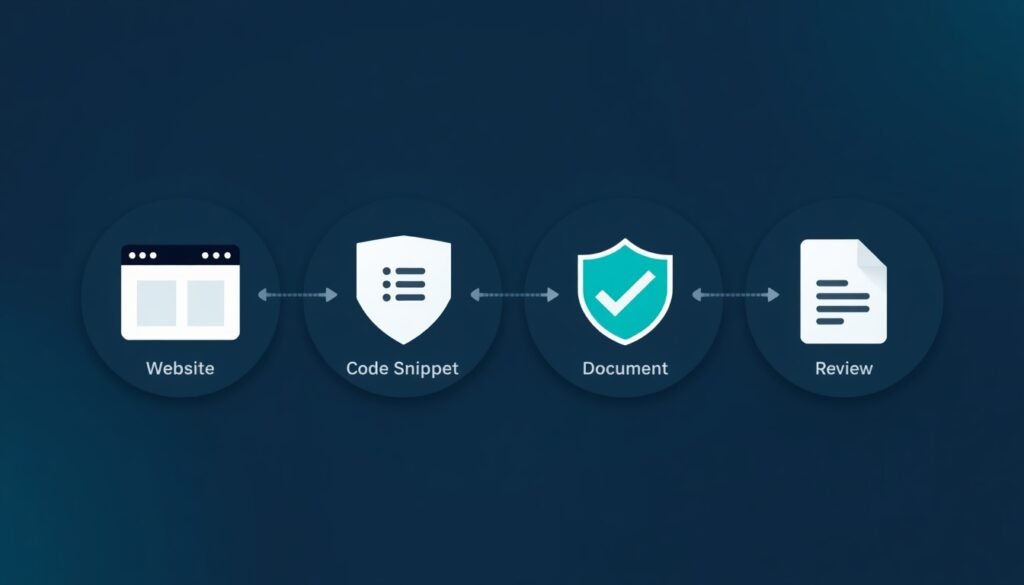
Step 3: Verify Website Ownership and Add AdSense Code
Google AdSense website verification helps Google confirm that you can access and manage the website you want to submit.
Depending on the options available to your account and website, Google may provide a code snippet or another supported verification method.
For AdSense code verification, follow the instructions associated with the specific method Google gives you. If you are asked to add code to your site’s HTML, place it exactly where the instructions specify. Some content management systems and website builders provide dedicated fields for this purpose.
Use these checks to avoid common errors:
- Copy the code exactly as provided.
- Publish the change to your live website rather than leaving it in a draft.
- Confirm that the code appears in the required location.
- Clear relevant caching layers if they prevent updates from appearing.
- Avoid adding duplicate or outdated snippets.
- Confirm that the site is publicly accessible to Google’s review systems.
If you are unsure how to connect website to AdSense on your platform, consult the platform’s official documentation or support team.
Step 4: Submit Your Website for Review
After completing the required connection and verification steps, follow the instructions in your AdSense account to submit the website for review.
During the AdSense site review process, Google evaluates the site against its applicable program requirements and policies. Review times vary, and Google does not guarantee a specific approval date.
While waiting:
- Keep your website accessible.
- Maintain useful, original content.
- Check your account for status updates or additional instructions.
- Avoid removing required verification code.
- Fix any issues identified by Google.
Google AdSense website approval is determined by Google. Following a tutorial can help you prepare, but it cannot guarantee approval.
Step 5: Fix Common AdSense Connection and Approval Problems
If your site cannot be verified or your application is declined, check the status and explanation in your account first.
Common issues include:
- Verification errors: The code may be missing, incorrectly placed, or unavailable on the live site.
- Insufficient content value: Pages may lack original information or offer little value to readers.
- Navigation problems: Important pages, menus, or links may be broken.
- Policy violations: Some content or website practices may not comply with publisher policies.
- Accessibility issues: Google may be unable to access the site or review the relevant pages.
If you see a Google AdSense site not approved message, do not immediately submit the same website again without addressing the problem. Read the stated reason, make relevant improvements, and follow the instructions for requesting another review.
If you are asking what to do when your website is not approved by AdSense, focus on resolving the underlying issues instead of making random changes.
Google AdSense Ads.txt Setup
The Google AdSense Ads.txt setup is another task you may encounter after connecting your website.
An ads.txt file is a publicly accessible text file that identifies authorized sellers of a website’s advertising inventory. It helps buyers verify authorized selling relationships.
To understand how to add Ads.txt to a website, check the instructions in your AdSense account and your hosting platform’s documentation. When required, the file is commonly published at the root of your domain, such as yourdomain.com/ads.txt, with the appropriate seller information supplied by Google.
After publishing it, check that the file is accessible at the expected address and that its contents match the instructions.
Remember that ads.txt is not a shortcut to AdSense approval. It does not directly improve CTR or guarantee revenue.
Strikingly Google AdSense Integration
Strikingly users should confirm their platform’s current integration options before attempting to add advertising code. Strikingly Google AdSense integration may depend on the website setup, available features, and subscription plan.
If you want to learn how to add AdSense to Strikingly, follow this approach:
- Check your plan and available features. Confirm whether your setup supports the custom code, scripts, or other functionality required for the intended integration.
- Consult the official support documentation. Find the current instructions for adding third-party scripts or verification code. Do not rely on outdated menu names or tutorials.
- Confirm your domain. To connect Strikingly website to AdSense, make sure the domain submitted to Google matches your published website and is accessible for review.
- Follow the verification instructions. Use the method supported by both your site setup and your AdSense account.
- Check ads.txt support if needed. Confirm whether your configuration allows you to publish the required file and how to do so.
It is important to distinguish three stages:
- Connection: Add your site to AdSense and complete the required verification.
- Review: Google evaluates your website and decides whether it meets the applicable requirements.
- Ad display: After approval, configure available ad options and follow Google’s placement policies.
If a necessary feature is unavailable, consult Strikingly support about your options before changing plans or moving platforms.
What Is Click-Through Rate (CTR) in Google AdSense?
Once ads are running, click-through rate becomes one of the metrics worth monitoring.
CTR measures how frequently clicks occur relative to a specified number of impressions or page views. The correct interpretation depends on which CTR metric you are viewing in your AdSense report.
CTR is useful, but it should not be treated as the only measure of website performance. Revenue also depends on impressions, advertiser demand, click value, and other factors.
How AdSense CTR Is Calculated
For ad CTR, the basic formula is:
Ad CTR = (Ad clicks ÷ Ad impressions) × 100
For example, if your ads receive 2,000 impressions and 20 clicks, the ad CTR is 1%.
This example explains the calculation; it does not mean 1% is the ideal CTR for every website.
A small sample can also produce misleading results. When impressions are limited, a few additional clicks can change the percentage substantially. Compare results over meaningful periods and account for changes in traffic.
What Is the Difference Between Ad CTR and Page CTR?
Ad CTR and page CTR use different denominators.
- Ad CTR: Ad clicks divided by ad impressions, multiplied by 100.
- Page CTR: Ad clicks divided by page views, multiplied by 100, according to the standard AdSense page CTR definition.
For example, a page can generate several ad impressions during one page view. As a result, page CTR and ad CTR may differ even when they come from the same website.
Check the metric definition in your current report before comparing results. Avoid comparing page CTR from one report with ad CTR from another.
There is no universal CTR target that guarantees strong performance. Results vary according to content niche, audience, device, traffic source, ad format, and advertiser demand. Your own historical performance is usually a more useful starting point than an arbitrary figure from another website.

Why Is Your Google AdSense CTR Low?
A low CTR does not automatically mean something is broken. Treat the following factors as possibilities to investigate, and use your website data to determine which ones may apply.
Low-Quality or Irrelevant Traffic
Visitors who arrive at a page that does not meet their expectations may leave quickly and show little interest in its content or ads.
Review traffic sources, search queries, referral links, and engagement patterns. If a source produces visits that are poorly matched to your content, investigate the reason.
Never purchase traffic or generate artificial interactions to inflate your numbers. Invalid traffic can put your AdSense account at risk.
One practical way to attract the right visitors is to plan your content around what people are actually searching for. Keyword clustering for SEO can help you organize your topics so they reach readers who genuinely care about your subject.
Poor Ad Placement and Website Layout
Ads positioned where visitors rarely see them may receive fewer impressions or clicks. However, adding more ads or moving them into prominent positions is not automatically the right solution.
A crowded layout can frustrate visitors, obscure content, and reduce trust. Placement should balance visibility with readability and a clear distinction between advertising and editorial content.
Content That Does Not Match Visitor Intent
A reader following a technical tutorial may be focused on completing a task, while a reader comparing products may be researching a potential purchase. Different visitor needs can lead to different patterns of ad interaction.
Review the purpose of each page and whether it provides the information visitors expected. Do not change content or placement simply to pressure readers into clicking ads.
Mobile Usability and Slow Page Speed
If a large share of your audience uses smartphones, poor mobile design can undermine the experience.
Check whether text is readable, navigation works, and the layout fits smaller screens. Slow pages may also cause visitors to leave before the content or ads become visible.
Ad Visibility and User Experience Issues
Late-loading ads, unexpected layout shifts, intrusive overlays, and excessive scripts can make a site frustrating to use.
Review page performance and test the experience on common devices. A clear, fast, and accessible site gives visitors a better experience, although it cannot guarantee a higher CTR.
How to Fix Low Google AdSense CTR
Start with your data rather than making several changes at once. This makes it easier to identify what is helping and what is not.
Improve Ad Placement Without Disrupting User Experience
Review where ads appear relative to your content. Consider whether visitors can see them naturally while reading, without the ads interrupting the information they came to find.
- Keep ads visually distinguishable from editorial content.
- Avoid placing ads too close to navigation, buttons, or other interactive elements.
- Do not make ads look like download links, menu options, or content recommendations.
- Avoid layouts that could encourage accidental clicks.
- Test one placement change at a time and monitor the results.
The goal is to improve the overall experience, not to trick visitors into interacting with ads.
Create Helpful, Relevant Content
Useful content attracts readers who are genuinely interested in your subject. It can also encourage visitors to explore other relevant pages on your site.
Focus on answering real questions, explaining topics thoroughly, organizing articles clearly, and updating information when necessary.
Do not add unnecessary paragraphs simply to increase word count. Content should serve the reader’s needs first.
If you publish several articles on the same subject, a topical authority SEO strategy can help connect them and make your content stronger as a whole.
Optimize Your Website for Mobile Devices
Test your website on actual mobile devices as well as desktop screens.
Check:
- Text size and readability.
- Navigation menus and tap targets.
- Responsive layout behavior.
- Ad spacing and visibility.
- Page loading speed.
- Unexpected layout shifts.
Review device-level performance reports where available. If mobile results differ substantially from desktop results, investigate the reasons before making broad changes.
Analyze Traffic Sources and Audience Behavior
Search engines, social media, newsletters, and referral websites can bring visitors with different expectations.
Use analytics tools to understand which sources bring relevant visitors and which pages keep them engaged. A high visit count alone does not prove that the traffic is useful.
If one source produces unusual traffic patterns, investigate its quality and legitimacy. Do not assume that low CTR alone proves invalid traffic.
Keep an eye on newer traffic sources as well. Understanding website traffic from AI search can help you see how visitors from AI tools behave compared with visitors from regular search.
Use AdSense Reports to Identify Performance Problems
AdSense reporting can help you examine performance across available dimensions, such as pages, ad formats, devices, and countries.
Use a consistent comparison period and look for patterns. For example, you might find that one page performs differently from similar pages or that mobile results changed after a layout update.
Where possible, combine advertising reports with analytics and performance tools to examine page views, engagement, and loading behavior.
Avoid drawing strong conclusions from a small number of impressions. The aim is to identify meaningful patterns, not to react to every daily fluctuation.
Best Practices for Google AdSense Ad Placement
Responsible placement should protect user experience and comply with Google’s current policies.
- Put useful content first and let ads support the page rather than overwhelm it.
- Use responsive formats when appropriate for your website.
- Keep clear separation between ads and navigation or interactive elements.
- Avoid placements that may cause accidental clicks.
- Keep the page readable and limit unnecessary clutter.
- Test changes gradually and document what you changed.
- Review current Google publisher and ad placement policies before implementing new formats.
Use any testing features available in your account according to their instructions. Judge changes over time, and do not assume that a higher CTR automatically means a better user experience or greater overall revenue.

Google AdSense Policies You Must Follow
Google’s publisher policies protect advertisers, publishers, and visitors. Violations can lead to restricted ad serving or other account consequences, so policy compliance should be part of your ongoing website management.
Avoid Accidental Clicks and Invalid Traffic
Do not position ads so they overlap buttons, sit too close to navigation controls, or appear to be part of your editorial content.
Never use bots, purchased invalid traffic, automated clicking, or other artificial methods to inflate impressions or clicks. If your traffic changes unexpectedly, investigate the source rather than trying to increase interaction artificially.
Why You Must Never Click Your Own Ads
Do not click your own ads, even if you want to test whether they work. Do not ask friends, readers, or employees to click them, and do not offer rewards in exchange for clicks.
These actions can create invalid activity and put your account at risk. Use the testing and preview options provided by Google when available.
How to Improve CTR Without Violating AdSense Policies
Focus on legitimate improvements:
- Publish useful, relevant content.
- Attract genuine visitors interested in your subject.
- Improve readability and mobile usability.
- Make reasonable, carefully measured placement adjustments.
- Investigate performance through reports rather than guessing.
- Keep advertising clearly distinguishable from the rest of the page.
If a tactic depends on confusing visitors or encouraging accidental clicks, do not use it.
How to Monitor AdSense Performance and Measure Improvements
A simple measurement process helps you understand whether a change is producing a meaningful result.
- Record a baseline. Note CTR, impressions, page views, and estimated earnings for a representative period.
- Choose one change. Adjust one layout element or ad setting at a time.
- Allow enough data to accumulate. Small samples can fluctuate substantially, so avoid making decisions based on a few clicks.
- Compare similar periods. Consider seasonal trends, traffic changes, and differences between devices.
- Evaluate more than CTR. Review page speed, engagement, impressions, and overall revenue where relevant.
- Keep a change log. Record when you made an adjustment and what happened afterward.
If a change harms readability or makes navigation more difficult, reconsider it even if one advertising metric improves.
Remember that correlation does not necessarily prove causation. Traffic changes, advertiser demand, and other factors may affect performance during the same period.
Google AdSense Connection and Low CTR: Common Mistakes to Avoid
Avoid these common mistakes when connecting a website or troubleshooting low CTR:
- Applying without checking whether the site meets Google’s current requirements.
- Publishing thin or repetitive content that provides little value.
- Entering the wrong domain or failing to complete the requested verification.
- Assuming that adding ads.txt guarantees approval or increases CTR.
- Resubmitting a declined website without addressing the stated issue.
- Changing several advertising elements at once.
- Judging performance using too few impressions.
- Using deceptive ad placements or encouraging accidental clicks.
- Ignoring mobile usability and page speed.
- Treating another website’s CTR as a universal benchmark.
- Assuming that a successful connection automatically means the site will earn significant revenue.
A careful, evidence-based approach is more useful than repeatedly changing settings without a clear reason.
Frequently Asked Questions
How do I connect my website to Google AdSense?
Sign in to AdSense, add your domain in the Sites section, complete the verification method provided by Google, and submit the site for review. Follow the current instructions in your account, because available methods and interface labels may change.
Why is my AdSense CTR so low?
Possible causes include traffic quality, ad visibility, content relevance, device usability, and page performance. Review your reports and analytics to identify patterns before changing your layout.
What is a good Google AdSense CTR?
There is no universal CTR that is ideal for every website. Performance varies by niche, traffic source, audience, device, and ad format. Compare your own results over time and avoid relying on unsupported benchmarks.
How long does AdSense website approval take?
Approval times vary, and Google does not guarantee a specific timeline. Check your AdSense account for the latest status and follow any instructions or requests for additional action.
Can changing ad placement improve CTR?
It can affect ad performance, but the result is not guaranteed. Make policy-compliant changes gradually and prioritize readability, accessibility, and a positive user experience.
Can low CTR affect AdSense earnings?
CTR can influence earnings because clicks are one possible source of advertising revenue. However, total earnings also depend on impressions, advertiser demand, click value, and other factors. Evaluate the overall performance rather than CTR alone.
What should I do if my website is not approved by AdSense?
Read the explanation provided in your account, check the relevant publisher policies, fix the underlying problems, and follow Google’s instructions for requesting another review. Avoid repeatedly resubmitting the same site without meaningful improvements.
Conclusion: Connect AdSense Properly and Improve CTR Responsibly
Learning how to add website to Google AdSense starts with preparing a useful website, entering the correct domain, completing the required verification, and following Google’s review process. Approval is not guaranteed, so use the feedback in your account to address any problems.
Once ads are active, improving CTR is a separate process. Review your traffic, understand the metrics in your reports, improve mobile usability, and make careful adjustments that respect Google’s policies.
If you use a website builder such as Strikingly, confirm the current integration methods and plan requirements through its official documentation. Most importantly, focus on genuine visitors, useful content, and a trustworthy website experience. AdSense can form part of a broader monetization strategy, but neither approval nor a particular CTR or earnings level can be guaranteed.





Leave a Reply