
Every website has pages that disappear. A publisher redesigns its blog, a software company retires a free tool, a research group takes a guide offline. The links pointing to those pages don’t vanish with them. They stay in articles and resource lists, sending readers to dead ends.
Broken link building turns that decay into an opportunity. You find a dead page that other sites still link to, create something genuinely useful to replace it, and let the right site owners know. If your page serves their readers better than a dead link does, some will update their pages.
This guide covers the full process: finding opportunities, evaluating them, building the replacement, running outreach, and measuring what happened. It’s written for site owners, bloggers, SEO professionals, and agencies in the US, UK, and Canada. A good broken link building strategy rests on relevance and usefulness, not volume.
What Is Broken Link Building?
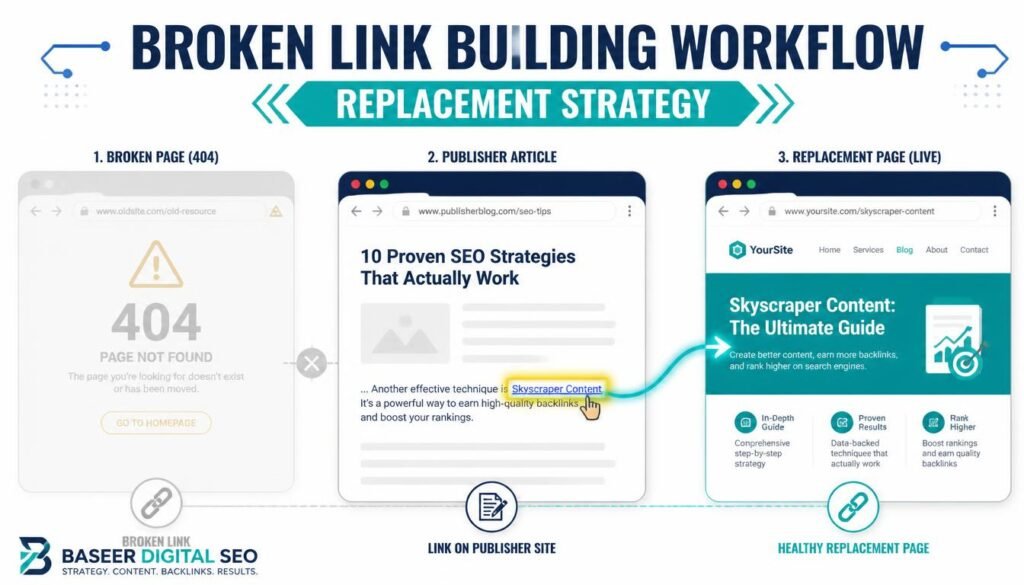
Broken link building is a link-earning method where you suggest your content as a replacement for a link that no longer works. The site owner fixes a flaw on their page, and you earn a backlink.
How Broken Link Building Works
The workflow has four moving parts. You locate a dead URL that still attracts links, confirm that sites worth contacting are linking to it, publish a strong alternative, and send a courteous note to the people responsible for those pages.
Nothing about it is automatic. The publisher decides whether to change anything, and many won’t reply at all. What you control is the quality of your research, your replacement content, and your outreach.
Why Broken Links Create Backlink Opportunities
Most editors don’t audit old pages often. A link that worked in 2021 may sit broken for years, and a dead link makes a page look neglected. Offering a working, relevant fix solves a real problem for the owner, which makes this one of the more natural forms of link prospecting.
The Difference Between Broken Links and Broken Backlinks
The terms get mixed up, so it’s worth being precise.
- Broken links on websites are outgoing links on a page that lead to an error, usually a 404. Your target here is the page containing the dead link.
- Broken backlinks are links from other sites that point to a page on a specific domain that no longer loads. The dead page is the target.
- Broken pages with backlinks are unavailable URLs that still have external links pointing at them. These are the raw material for the whole strategy.
A single dead URL can be viewed both ways. When you look at a competitor’s missing page, you’re looking at their broken backlinks. When you visit a site that links to it, you’re looking at a broken link on that site.
Does Broken Link Building Still Work?
Yes, with realistic expectations. It remains a legitimate way to earn editorial links, but it’s a numbers-and-effort game that rewards careful targeting.
Why Website Owners May Replace Broken Links
Site owners care about user experience, credibility, and tidiness. A reader clicking a dead link is a small failure on their page. If you make the fix easy, with a clearly relevant replacement and a short, friendly message, you’ve saved them research time. Some owners will also appreciate that you took the trouble to find the problem.
Benefits and Limitations of Broken Link Building
Benefits:
- Links are editorial and sit in a relevant context
- You help the publisher rather than asking for a favor
- It suits niches where traditional outreach is crowded
- A good replacement page can keep earning links after the campaign ends
Limitations:
- Response rates are unpredictable, and many emails go unanswered
- Quality opportunities can be scarce in small niches
- It takes research and content creation, not just outreach
- A backlink doesn’t guarantee better rankings, since many factors affect search engine performance
When This Strategy Is Worth Using
Use it when you already have, or can build, a resource that genuinely matches a dead page’s topic. It works especially well in industries with long-lived resource pages, such as software, finance, health information, education, and home services. If you’d have to bend your content awkwardly to fit, skip the opportunity.
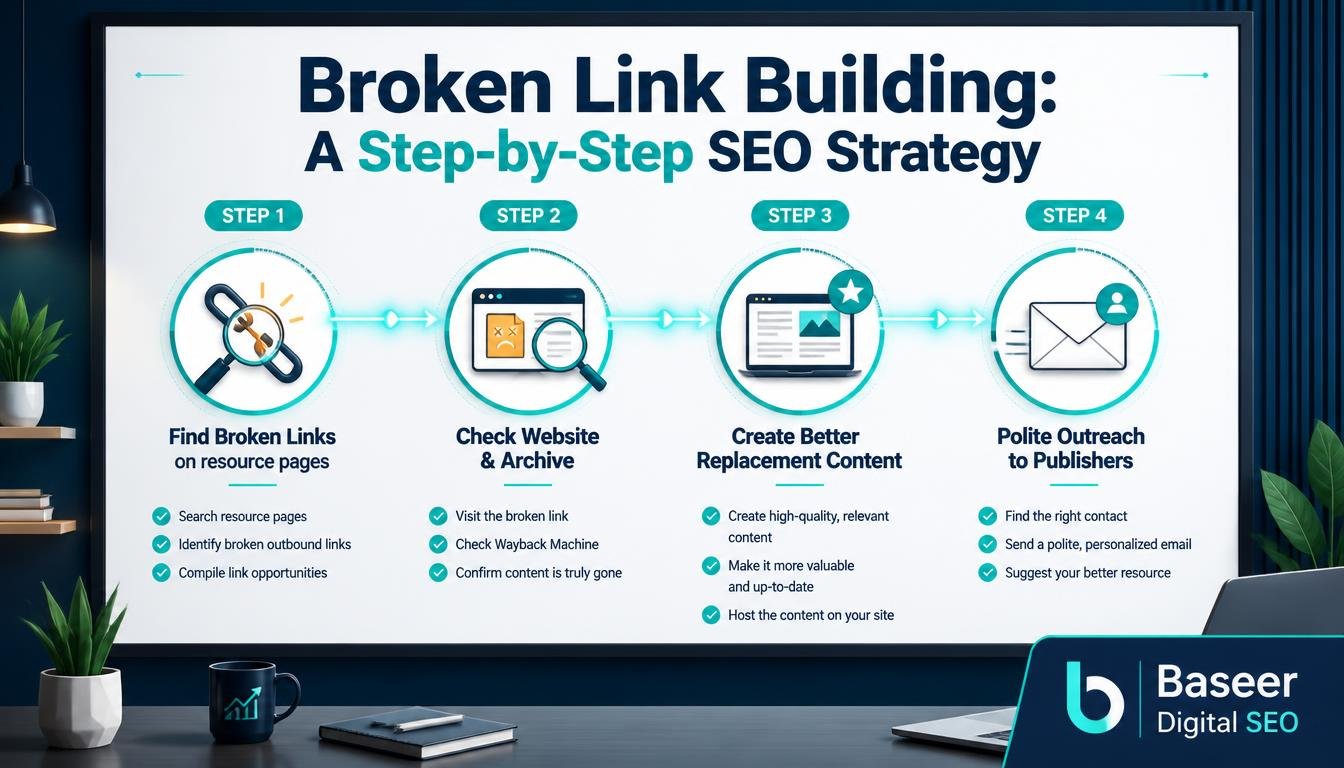
How to Do Broken Link Building: A Step-by-Step Process
Here’s the full sequence in brief. Later sections expand each stage.
Step 1: Find Broken Pages With Backlinks
Use backlink tools and competitor research to uncover unavailable URLs that still attract links. Prioritize topics you can credibly cover.
Step 2: Vet the Link Prospects
Check the sites linking to the dead page. Confirm relevance, editorial quality, and whether a link to your content would make sense in context.
Step 3: Create a Relevant Replacement Page
Publish a page that serves the same need as the original, preferably better. Research the old content first so you understand why people linked to it.
Step 4: Conduct Personalized Outreach
Write short, specific emails to the editor or owner. Explain the broken link and suggest your page naturally.
Step 5: Follow Up and Track Results
Send a brief, polite reminder, then record replies, acquired links, and the effort involved so you can refine the process.
How to Find Broken Pages With Backlinks
There are several reliable discovery routes. Mix them, because each surfaces different types of prospects.
Find Your Competitors’ Broken Pages With Backlinks
A competitor backlink analysis often uncovers the richest opportunities. Competitors remove pages, restructure sites, and sunset products, and their old URLs frequently keep their backlinks.
A UK marketing agency, for example, might review competing agencies’ domains for deleted guides on email deliverability or local SEO.
Check Competitor Pages With Valuable Backlinks
Look at which pages on a competitor’s domain attract the most links, then see whether any now return errors. In Ahrefs Site Explorer, a “best by links” style report filtered by response code is a common way to surface these. Confirm the exact report names against Ahrefs’ current documentation, since interfaces change.
Verify That the Original URL Is Actually Broken
Open the URL yourself. A page might be temporarily down, redirected, or blocking automated checkers. A true 404 or other error means the content has gone. Also check whether the owner has redirected the old URL to a new one, because that eliminates the opportunity.
Find Broken Pages Related to Your Topic
You don’t need to start with competitors. Research your own subject area and look for dead resources that once covered it. A Canadian e-commerce business selling outdoor gear could look for defunct trail guides, gear-care tutorials, or seasonal checklists.
Filter Prospects by Topic and Relevance
A long list of 404 not found pages is mostly noise. Keep only the URLs whose original subject matches content you can create or already own, and whose linking sites suit your audience.
Find Broken Links on Competing Websites
Many competitors link out to resources that have since died. Running a link checker across their guides and resource sections reveals broken outgoing links. Each one points to a dead page, and each competing page linking to it may have fellow publishers doing the same. This route overlaps with broken link analysis, but starts from the linking page rather than the dead URL.
Find Broken Links on Resource Pages
Resource page link building is the classic home of this tactic. Curated lists of tools, guides, and references are maintained slowly, so dead entries pile up. A resource page’s owner usually wants the list to stay useful, which makes them a receptive audience.
Identify Relevant Websites Linking to the Dead Page
Once you’ve found a dead URL, list every referring page. Sort them by relevance and quality before deciding who to contact. A hundred links from irrelevant directories are worth less than five from respected publications in your field.
Use the Wikipedia Dead Link Technique
Wikipedia marks citations to unavailable pages as dead links. You can find articles in your subject area with dead references, check the Wayback Machine for what the source said, and, if you have a genuinely better source, suggest it on the article’s talk page or follow Wikipedia’s editing guidelines.
Be careful here. Wikipedia has strict rules on neutrality and conflicts of interest, and its external links don’t pass ranking value in the way editorial links from other sites might. Treat it as a way to earn visibility and referral traffic, and only suggest sources that actually improve the article.
How to Evaluate Broken Link Building Opportunities
A 404 response doesn’t automatically mean an opportunity is valuable. Plenty of dead pages are dead for good reason, and many of their links come from sites you wouldn’t want to appear on. Evaluation saves you from wasting effort.
Check Backlink Quality and Referring Domains
Count unique referring domains rather than raw links, because one site can link to a page hundreds of times. Then look at who those domains are.
Check the Quality of Referring Websites
Look for genuine publications, active blogs, and respected resource curators. Avoid spam networks, scraped content sites, and pages whose only purpose is to hold outbound links. Strong backlink quality means the linking page has real readers and editorial oversight.
Check the Relevance of the Linking Website
Even a reputable site is a poor prospect if it has no connection to your topic. A UK personal finance blog is unlikely to link to a Canadian roofing guide, however good it is.
Assess Contextual Relevance
Read the sentence around the broken link. Would your replacement fit that context naturally? If the answer needs explaining, it probably isn’t a match.
Investigate Why the Original Page Attracted Links
Understanding the cause of those links tells you what to build. Was it a free template, a statistics roundup, a tool, a definitive guide? Reproducing the same value gives you the best chance of being accepted as a substitute.
Review the Original Page’s Backlink Profile
Check the anchor text, the types of sites linking, and how the links were distributed over time. This shows what content people were actually citing and in what circumstances.
Prioritize Relevant and Valuable Link Prospects
Rank your list by relevance first, quality second, and ease third. Domain metrics from third-party tools are estimates, not Google scores, so use them as a rough guide rather than a deciding factor.
Prioritize Opportunities With Genuine Editorial Value
Favor pages where a link would sit naturally within useful editorial content. These are the links most likely to be seen as high-quality backlinks by readers and by search engines alike.
How to Create a Replacement Page
Outreach is only as good as what you’re offering. Your replacement content must justify the change.
Create a Useful Content Outline
Start by listing what the original page covered, then add what it missed. Organize the new piece so readers can find answers quickly.
Match the Original Page’s Search Intent
If the old page was a how-to guide, don’t replace it with a sales page. People linked to it for a reason, and your page should satisfy that same need.
Include Original Insights and Linkable Resources
Original content gives people a reason to cite you. That could be a free template, a checklist, a short data study you conduct yourself, or a clear diagram that simplifies a hard concept.
Add Original Research, Examples, or Resources
A US software company replacing a retired API tutorial could include working code samples and a troubleshooting section. Keep claims supportable and cite sources where you use them.
Improve on the Original Content
Don’t simply copy what existed. Fix outdated advice, add current examples, and tidy the structure.
Make the Replacement Resource Better for Readers
Clearer writing, better organization, and up-to-date information all matter. If your page is merely as good as the original, there’s little incentive for anyone to switch.
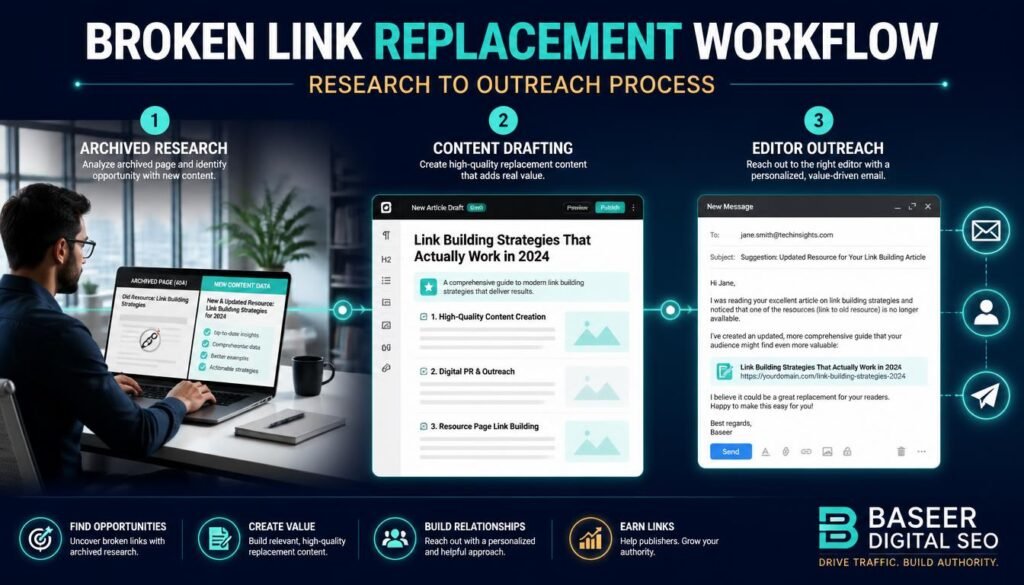
Use the Wayback Machine to Research Missing Content
The Wayback Machine archives historical versions of many web pages. Use it to review what the dead page said, how it was structured, and which sections attracted attention. It’s a research aid, so never republish someone else’s archived text as your own. Write a fresh, original version informed by what readers needed.
How to Conduct Effective Broken Link Building Outreach
Good link building outreach is short, human, and useful to the recipient.
Find the Right Website Owner or Editor
Sending a message to a general inbox rarely works.
Identify the Person Responsible for the Page
Check author bylines, “About” pages, and team directories. For larger publishers, look for a content editor or the page’s author, and use professional networks when no contact is listed.
Write Personalized Broken Link Outreach Emails
Backlink outreach emails should read like a note from one professional to another, not a mass mailing.
Personalize the Opening Line
Refer to something specific about their page or recent work. One genuine sentence beats three generic compliments.
Explain the Broken Link Clearly
Name the page, quote the anchor text, and say where the dead link appears so they can verify it in seconds.
Pitch a Relevant Replacement Resource
Your suggestion should be easy to evaluate and obviously relevant.
Offer the Replacement Resource Naturally
Present your page as one option, not a demand. Here’s a simple example:
Hi Sarah, I was reading your guide to remote team tools and noticed the link under “project planning templates” now returns a 404. If it’s helpful, I recently published a free template pack covering the same ground, which might work as a replacement: [URL]. Either way, thanks for a useful guide.
Follow Up Professionally Without Being Pushy
A single reminder is reasonable. People are busy, and emails get buried.
Keep Follow-Up Emails Brief and Professional
Wait about a week, send two or three lines, and then stop. If they don’t respond, move on.
Focus on Helping the Website Owner
Frame every message around what improves their page. If the replacement doesn’t help their readers, don’t pitch it.
Best Tools for Broken Link Building
Tools speed up research, but features and interfaces change, so check each provider’s current documentation before building a process around a specific report.
Ahrefs Site Explorer
Ahrefs Site Explorer is used to investigate a website’s backlink profile, top pages, and referring domains. For this strategy, it helps with competitor research and finding pages that have lost their content but kept their links.
Ahrefs Content Explorer
Ahrefs Content Explorer lets you search a large index of web pages by topic. It’s useful for locating relevant pages and resource lists, and its filters can help narrow results. Available options depend on your plan and current features.
Ahrefs Broken Links Reports
The Ahrefs Broken Links report, along with related backlink reports in Site Explorer, helps identify unavailable URLs with inbound links and outgoing links that fail. These reports are most useful as a starting point for deeper analysis, not a finished prospect list.
Website Link-Checking Tools
Browser extensions and crawlers can scan a single page or whole site for dead links. They’re the quickest way to run a broken link analysis on a specific resource page.
The Wayback Machine
The Wayback Machine helps you see what a lost page originally contained. It doesn’t always have a complete copy, so treat it as one source among several.
Common Broken Link Building Mistakes to Avoid
Most failed campaigns share a few predictable flaws.
Targeting Irrelevant Websites
If a site has nothing to do with your topic, a link won’t make sense to the owner or to readers. Stay close to your subject area.
Recommending Poor Replacement Content
A thin or promotional page undermines your whole pitch. If the owner clicks through and finds nothing useful, you’ve lost credibility.
Ignoring the Quality of Backlinks
Chasing every dead URL with any link at all fills your pipeline with weak prospects. Evaluate backlink quality before spending time.
Sending Generic Outreach Emails
Copy-and-paste messages stand out, and not in a good way. Personalization takes minutes and improves your chances significantly.
Spending Time on Low-Value Prospects
Set a threshold for relevance and quality, and stick to it. Fewer, better prospects will usually serve you better than a bloated list.
How to Measure Broken Link Building Results
Measure effort and outcomes together. A campaign that earns two excellent links from relevant publications may beat one that earns twenty weak ones.
Track Outreach Responses
Monitoring replies shows whether your targeting and messaging are working.
Record Prospects and Outreach Dates
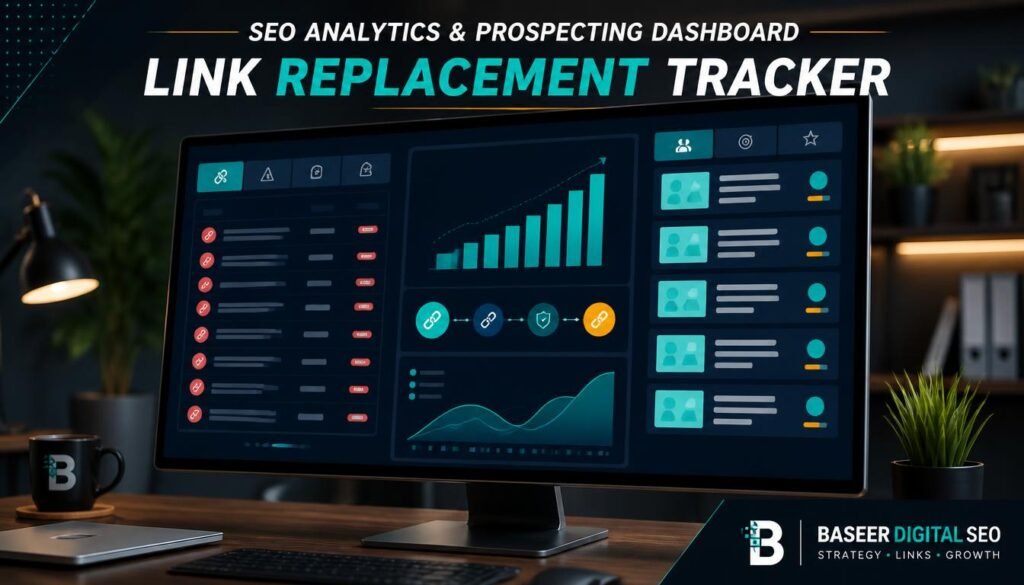
Keep a simple spreadsheet with the prospect, the dead URL, the linking page, contact details, dates sent, and status. It prevents duplicate emails and makes follow-ups easy.
Measure Acquired Backlinks and Referring Domains
Count links gained, but also note their context and relevance.
Track Positive Replies and Link Acquisitions
Note who agreed, who ignored you, and who declined. Then confirm that the link is live, since some owners promise changes and forget.
Monitor Organic Traffic and Keyword Performance
Use Google Search Console and your analytics platform to watch the replacement page’s impressions, clicks, and rankings. Allow time, because search engines need to recrawl and reassess pages. Other factors also affect results, so don’t credit links alone.
Review Referring Domains Over Time
Trends tell you more than snapshots. Check whether new referring domains are relevant and whether links remain in place.
Evaluate Campaign Efficiency
Consider whether the time invested produced worthwhile results.
Compare Campaign Effort With Results
Divide hours spent by links earned, and compare against other tactics you use. If broken link replacement works well for one topic and poorly for another, shift your attention accordingly.
Final Thoughts
Broken link building works because it solves a problem for someone else. You find dead pages that still attract links, check that the prospects are relevant, create replacement content worth linking to, and make a polite, personalized request. Then you measure what happened and improve the next round.
It’s no shortcut, and some of your emails will go unanswered. But a disciplined broken link building strategy can produce relevant, editorial links that fit naturally on pages people actually read.
Start small: pick one topic you know well, find five solid dead URLs, build one excellent replacement page, and see what you learn.
Frequently Asked Questions
What Is Broken Link Building in SEO?
It’s a link-earning tactic in which you find broken links, create or choose a relevant replacement resource, and ask the site owner to link to it instead.
How Do You Find Broken Pages With Backlinks?
Use backlink tools to check competitor domains and topic-related sites for URLs that return errors but still have referring links. Link checkers and archive tools can help you verify and research them.
Is Broken Link Building Still Effective?
It can be, particularly in niches with many resource pages and a strong content offering. Results vary, and success depends on relevance, content quality, outreach, and the publisher’s decision.
Which Tools Help Find Broken Links?
Ahrefs Site Explorer, Ahrefs Content Explorer, and Ahrefs’ broken-link reports help with discovery. Browser-based link checkers help verify dead links on pages, and the Wayback Machine helps research missing content. Check current documentation, since features change.
How Do You Ask a Website Owner to Replace a Broken Link?
Write a short, personal email naming the page and the dead link, then suggest your replacement as a helpful option. Keep the tone friendly and make it easy for them to say no.
Does Broken Link Building Guarantee Better Google Rankings?
No. A relevant link may contribute to visibility, but rankings depend on content quality, relevance, user experience, competition, and many other factors. No one can guarantee a specific result.





Leave a Reply